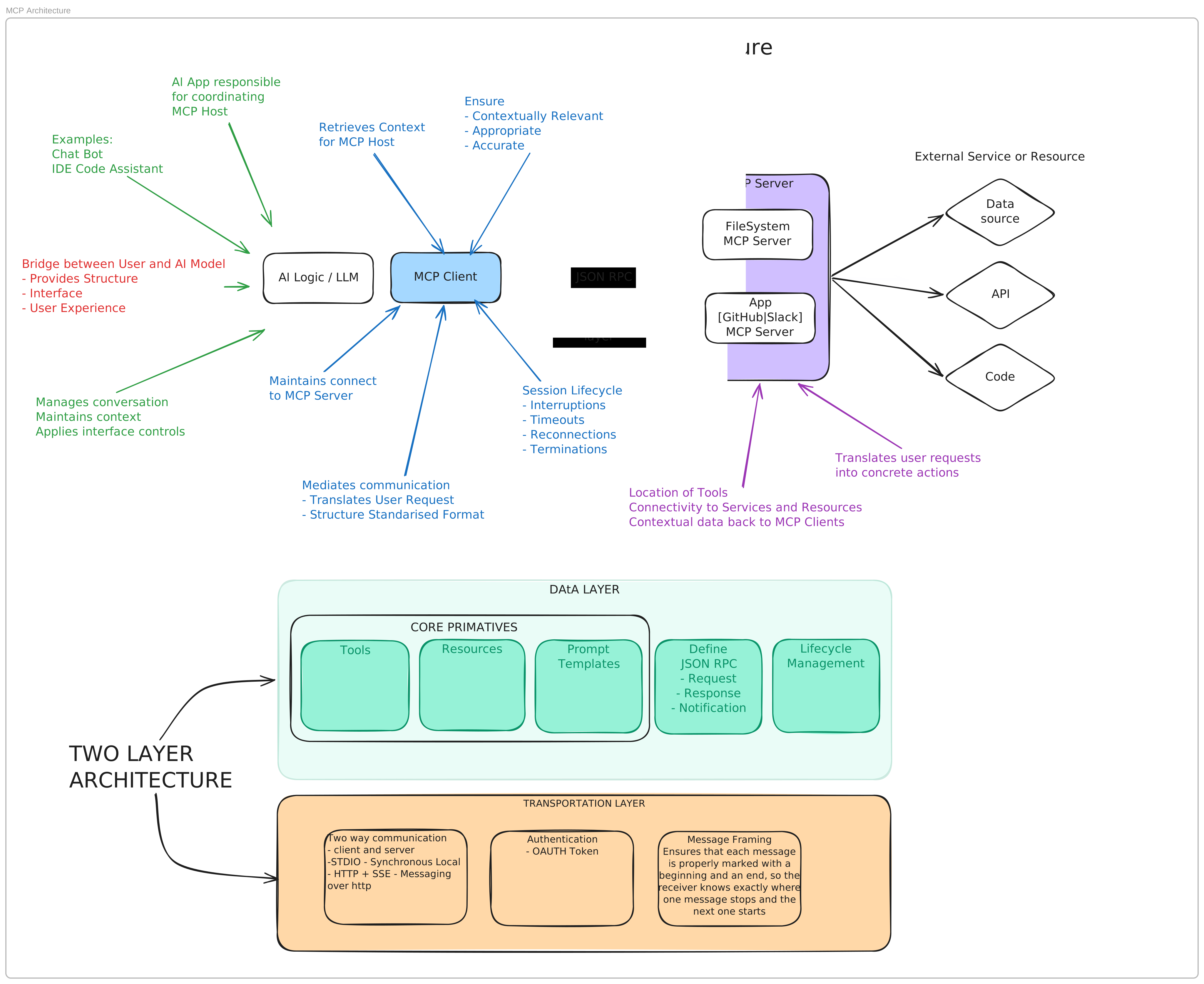
MCP Architecture
What is MCP
An open source standard enabling AI applications with the capabilities of external systems. Allow them to execute tasks, retrieve data, and perform specialised workflows.
Think USB universal port for AI applications. MCP is a standard way to connect different external systems. Standards allow for simple implementation without bespoke code, improved interoperability, extensibly and scalable.
Architecture
Two layers: Data and Transportation
The data layer has 3 core primitives: Tools, Resources, and Prompts. Plus definition of the communication method JSON-RPC Request, Response, and Notification.
The Transportation layer handles bidirectional messaging over JSON-RPC. Either STDIO, for local connection, or HTTP for remote calls. Authentication is handled in a number of ways. Basic, bearer token, session and OAuth 2.0 / OIDC
There are two side to an MCP implementations. The Host and the Server. The host manages multiple MCP clients. Each client handles its own session with a server.
Implementation [Python]
FastMCP is a full framework for building Model Context Protocol (MCP) applications. It provides a clean API for servers, clients and apps. It can easily expose Python functions as MCP tools, connect to local and remove MCP servers, and return interactive interfaces from those tools.
Reference Implementations
Create a server and client using FastMCP
mkdir my-mcp-server && cd my-mcp-server
A minimal pyproject.toml for a typical FastMCP server project, set up with uv:
[project]
name = "my-mcp-server"
version = "0.1.0"
description = "An MCP server built with FastMCP"
requires-python = ">=3.10"
dependencies = [
    "fastmcp>=3.0",
]
Initiate the project with a new virtual env and required dependencies.
uv sync
Create a basic server.py.
from fastmcp import FastMCP

mcp = FastMCP("My MCP Server")

@mcp.tool
def greet(name: str) -> str:
    return f"Hello, {name}!"

if __name__ == "__main__":
    # mcp.run() # this starts a local STDIO transport
    mcp.run(transport="http", port=8000) # this starts a http server
Start the server
uv run server.py

[09/29/26 13:40:46] INFO     Starting MCP server 'My MCP Server' with transport 'http' on http://127.0.0.1:8000/mcp                                     transport.py:363
INFO:     Started server process [97057]
INFO:     Waiting for application startup.
INFO:     Application startup complete.
INFO:     Uvicorn running on http://127.0.0.1:8000 (Press CTRL+C to quit)
Create a new folder for the client.
mkdir my-mcp-client && cd my-mcp-client
A minimal pyproject.toml for a typical FastMCP client project, set up with uv:
[project]
name = "my-mcp-client"
version = "0.1.0"
description = "An MCP client built with FastMCP"
requires-python = ">=3.10"
dependencies = [
    "fastmcp>=3.0",
    "asyncio"
]
Create a basic client.py.
import asyncio
from fastmcp import Client

client = Client("http://localhost:8000/mcp")

async def call_tool(name: str):
    async with client:
        result = await client.call_tool("greet", {"name": name})
        print(result)

asyncio.run(call_tool("Dommo"))
Run the client to call the MCP server tool ‘greet’
uv run client.py
CallToolResult(content=[TextContent(type='text', text='Hello, Dommo!', annotations=None, meta=None)], structured_content={'result': 'Hello, Dommo!'}, meta={'fastmcp': {'wrap_result': True}, 'io.modelcontextprotocol/serverInfo': {'name': 'My MCP Server', 'version': '4.0.10'}}, data='Hello, Dommo!', is_error=False)
You will see two things.
One: The client will log the response of your call with a structured response.
CallToolResult(content=[TextContent(type='text', text='Hello, Dommo!', annotations=None, meta=None)], structured_content={'result': 'Hello, Dommo!'}, meta={'fastmcp': {'wrap_result': True}, 'io.modelcontextprotocol/serverInfo': {'name': 'My MCP Server', 'version': '4.0.10'}}, data='Hello, Dommo!', is_error=False)
Two: The server logs the request.
INFO:     127.0.0.1:65399 - "POST /mcp HTTP/1.1" 200 OK
INFO:     127.0.0.1:65399 - "POST /mcp HTTP/1.1" 200 OK
INFO:     127.0.0.1:65399 - "POST /mcp HTTP/1.1" 200 OK
Why 3 POST logs for a single call?
| # | Method | Purpose |
|---|---|---|
| 1 | initialize |
Client declares its protocol version + capabilities; server responds with its own + a session ID |
| 2 | notifications/initialized |
Client confirms “I’m ready” (a notification — no response expected) |
| 3 | tools/call |
The actual tool invocation you wrote in call_tool() |
The full sequence can be found mcp-sequence.
Wait a second - This is just a api call. A whole lot of fuss for a simple http call.
Yes, but the power of MCP isn’t in a single call. It’s the protocol layer around it.
- Discovery
With MCP the client tools/list receives a structured metadata. An LLM can read this schema and autonomously decide when and how to use the tool.
- NxM vs N+M
An MCP server for an API can work across all hosts. Zero additional integration work.
- Resources
Different from tools, they provide context to LLM host. Data schemas, files contents, docs, config. They can be cached to reduce token costs.
- Prompts
Reusable, parameterised workflow templates. Encodes the domain expertise once.
The fuss pays off with the runtime discovery, build once approach, across 3 distance control planes (model, app, user) and protocol semantics like sampling, elicitation, and notifications.
API vs MCP
Standardisation and modularity: API can conforms to the design principles like REST or SOAP, but are bespoke in their implementation. A bookstore and a pet store API can use REST, comply with good HTTP usage, but would have different resources and actions to implement. MCP is a a protocol, and standardises around the 3 primitives, or capabilities: Tools; Resources; Prompts. These cover actions, data, and workflows. MCP can also have interactions, in the form of elicitation. This server-initiated follow-up capability (the server pauses and asks the user for more input mid-operation) is different from an API’s single request/response cycle.
Reference Implementations
Basic local STDIO https://github.com/dominicfarr/mcp-working-notes-example
Overview